
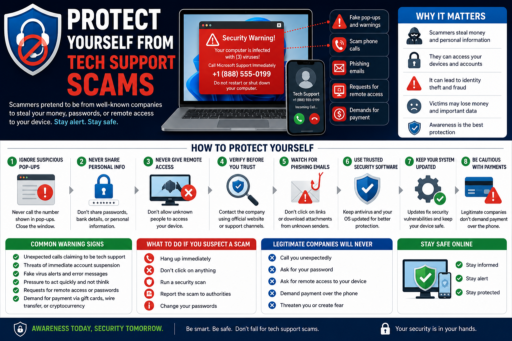
Tech support scams have become increasingly common as cybercriminals target internet users through fake pop-ups, scam phone calls, phishing emails, and fraudulent security warnings. Learning how to protect yourself from tech support scams can help users avoid fear-based scams, reduce cybersecurity risks, and prevent criminals from stealing money, passwords, or remote access to devices.
Learning how to protect yourself from tech support scams can help users improve cybersecurity awareness, reduce online fraud risks, and protect sensitive personal information in 2026.
Scammers often pretend to represent trusted companies such as Microsoft, Google, antivirus providers, or internet service companies to appear legitimate.
In this beginner-friendly guide, you will learn:
- What tech support scams are
- How tech support scams work
- Common warning signs
- How scammers target victims
- Ways to improve online safety
- Common cybersecurity mistakes
- How to stay safer online in 2026
What Does How to Protect Yourself From Tech Support Scams Mean?
Learning how to protect yourself from tech support scams means recognizing fraudulent attempts designed to scare users into paying money or giving scammers access to personal devices and information.
Tech support scams often involve:
- Fake virus alerts
- Scam phone calls
- Suspicious pop-ups
- Remote access requests
- Fake antivirus warnings
Cybersecurity awareness may significantly reduce scam risks.
Why How to Protect Yourself From Tech Support Scams Matters
Tech support scams may lead to:
- Financial fraud
- Identity theft
- Malware infections
- Unauthorized account access
- Privacy risks
Improving cybersecurity awareness may help users avoid these online threats.
According to the Federal Trade Commission (FTC), scam awareness and safer browsing habits help reduce online fraud risks.
1. Never Trust Unexpected Tech Support Calls
Legitimate companies usually do not call users unexpectedly to report computer infections or security problems.
Unexpected support calls should always be treated cautiously.
2. Avoid Clicking Suspicious Pop-Ups
Scam pop-ups often claim:
- Your computer is infected
- Your files are at risk
- Your device is hacked
- You must call support immediately
These messages are often designed to create panic and urgency.
3. Never Give Remote Access to Strangers
Scammers may request remote access to devices through support software.
Granting remote access may expose:
- Passwords
- Personal files
- Banking information
- Online accounts
Only trusted professionals should ever access devices remotely.
4. Watch for Phishing Emails
Some tech support scams begin through phishing emails containing:
- Fake invoices
- Suspicious attachments
- Dangerous links
- Fake security warnings
5. Use Trusted Antivirus Software
Legitimate security software may help detect:
- Malware
- Spyware
- Unsafe downloads
- Suspicious websites
Trusted protection tools may improve cybersecurity significantly.
6. Verify Company Websites Carefully
Scammers sometimes create fake websites that imitate real companies.
Always verify:
- Website addresses
- Company contact details
- Official support pages
Fake websites often contain suspicious URLs or spelling mistakes.
7. Keep Devices Updated
Software updates often include important security patches.
Outdated systems may contain vulnerabilities that scammers and hackers exploit.
8. Use Strong Passwords and MFA
Strong account protection helps reduce cybersecurity risks.
9. Be Careful With Payment Requests
Scammers often demand:
- Gift cards
- Wire transfers
- Cryptocurrency payments
- Immediate payments
Urgent payment demands are major scam warning signs.
10. Learn Common Scam Warning Signs
Common tech support scam signs include:
- Fear-based messages
- Urgency tactics
- Unexpected calls
- Remote access requests
- Suspicious downloads
Recognizing scam behavior may significantly improve online safety.
Common Tech Support Scam Mistakes
1. Trusting Unexpected Warnings
Scam pop-ups are often fake.
2. Downloading Suspicious Software
Fake security tools may contain malware.
3. Sharing Passwords
Legitimate support companies should never ask for passwords directly.
4. Ignoring Cybersecurity Awareness
Scam education is one of the best protections.
5. Acting Too Quickly
Scammers often rely on panic and urgency.
How Beginners Can Improve Scam Protection
- Avoid suspicious pop-ups
- Verify company websites
- Use strong passwords
- Enable MFA
- Practice safer browsing habits
Simple cybersecurity habits may significantly reduce scam risks.
Why Tech Support Scam Awareness Matters More in 2026
Online scams continue becoming more advanced and realistic.
Improving scam awareness may help reduce:
- Financial fraud
- Identity theft
- Malware infections
- Unauthorized access
Cybersecurity awareness continues becoming increasingly important.
Related Articles
- Remove Malware From Your Computer
- How to Lock Down Your Social Media Accounts
- Use Multi-Factor Authentication Everywhere
Final Thoughts on How to Protect Yourself From Tech Support Scams
Learning how to protect yourself from tech support scams can help users improve cybersecurity awareness and reduce online fraud risks.
You do not need advanced technical knowledge to avoid most scams.
Instead, focus on:
- Cybersecurity awareness
- Recognizing scam warning signs
- Safer browsing habits
- Strong account protection
- Careful online behavior
Most importantly, remember that slowing down and verifying suspicious messages may prevent many online scams.