
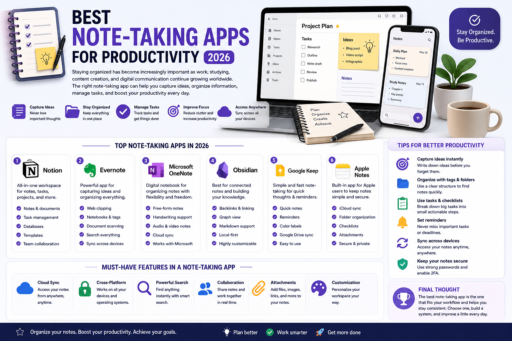
Staying organized has become increasingly important as work, studying, content creation, and digital communication continue growing worldwide. Learning about the best note-taking apps for productivity can help users organize ideas more effectively, reduce missed tasks, improve focus, and build better productivity systems in 2026.
Learning about the best note-taking apps for productivity can help users organize ideas, manage tasks more efficiently, and improve daily productivity in 2026.
Modern note-taking apps offer much more than simple text notes. Many now include cloud syncing, task management, collaboration tools, reminders, and productivity-focused features.
In this beginner-friendly guide, you will learn:
- Why note-taking apps matter
- Best productivity note-taking apps
- Important productivity features
- How to stay more organized
- Ways to improve focus
- Common productivity mistakes
- How to build better digital habits
Why Note-Taking Apps Matter
Productivity apps help users organize information more efficiently while reducing mental clutter.
Good note-taking systems may help users:
- Track ideas
- Organize projects
- Manage tasks
- Improve focus
- Increase productivity
Digital organization is becoming increasingly important in modern work and study environments.
1. Notion
Notion remains one of the most popular productivity apps in 2026.
Popular features include:
- Notes and documents
- Task management
- Project organization
- Databases
- Collaboration tools
Many users prefer Notion because of its flexibility and clean interface.
2. Evernote
Evernote focuses heavily on digital organization and note management.
It allows users to:
- Save web content
- Create notebooks
- Organize documents
- Track ideas efficiently
Evernote remains popular for personal productivity and work organization.
3. Microsoft OneNote
OneNote works especially well for users already using Microsoft products.
Popular features include:
- Free-form note organization
- Cloud syncing
- Cross-device support
- Digital notebooks
Students and professionals often prefer OneNote for long-term organization.
For more productivity guidance, you can also read this helpful guide from Microsoft OneNote support.
4. Obsidian
Obsidian focuses on connected note systems and knowledge management.
It is popular among users interested in:
- Deep work
- Research organization
- Knowledge linking
- Personal productivity systems
5. Google Keep
Google Keep provides lightweight and simple note-taking features.
It works well for:
- Quick reminders
- Shopping lists
- Fast notes
- Simple organization
Many users prefer Google Keep for quick daily productivity.
6. Use Tags and Categories
Organizing notes properly improves productivity significantly.
Useful categories may include:
- Work projects
- Personal tasks
- Ideas
- Goals
- Learning notes
7. Sync Notes Across Devices
Cloud syncing helps users access notes from:
- Phones
- Laptops
- Tablets
- Desktop computers
Cross-device access improves productivity flexibility.
8. Keep Productivity Systems Simple
Overcomplicated systems may reduce consistency.
Simple workflows are often easier to maintain long term.
9. Protect Productivity Accounts
Productivity apps often store sensitive personal or work information.
Users should:
- Use strong passwords
- Enable MFA
- Protect important accounts
If you want stronger account protection, read our guide on Use Multi-Factor Authentication Everywhere.
10. Review Notes Regularly
Reviewing notes consistently may help users:
- Remember ideas
- Stay organized
- Improve focus
- Increase productivity
Small productivity habits may create major long-term improvements.
Common Productivity Mistakes
1. Using Too Many Apps
Too many tools may create confusion and reduce consistency.
2. Ignoring Organization
Unorganized notes quickly become difficult to manage.
3. Overcomplicating Productivity Systems
Simple systems are often more sustainable.
4. Forgetting Regular Reviews
Reviewing notes improves long-term productivity.
5. Ignoring Security
Productivity accounts may contain important personal information.
How Beginners Can Improve Productivity
- Choose one main note-taking app
- Organize notes clearly
- Use reminders consistently
- Review notes weekly
- Build simple productivity habits
Small productivity improvements may significantly improve organization over time.
Why Productivity Apps Matter More in 2026
Digital work and online learning continue growing worldwide.
Productivity apps may help users:
- Stay organized
- Reduce mental clutter
- Track ideas efficiently
- Improve focus
Digital organization continues becoming increasingly important.
Related Articles
- Best Expense Tracker Apps in 2026
- Best Private Search Engines in 2026
- How to Remove Malware From Your Computer
Final Thoughts on Best Note-Taking Apps for Productivity
Learning about the best note-taking apps for productivity can help users improve organization, focus, and daily productivity.
You do not need complicated systems to become more productive.
Instead, focus on:
- Simple organization
- Consistent habits
- Clear note systems
- Task management
- Digital productivity
Most importantly, remember that small productivity habits may create significant long-term improvements over time.