
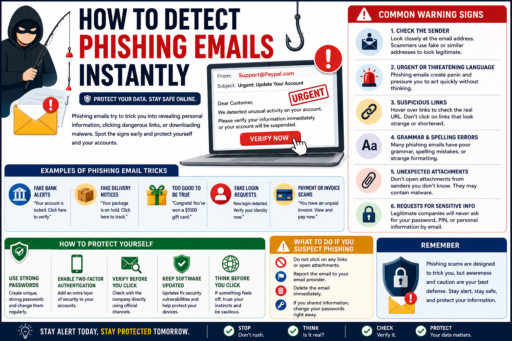
Phishing emails have become one of the most common cyber threats affecting internet users worldwide. Learning how to detect phishing emails instantly can help users avoid dangerous links, malware downloads, and scams designed to steal sensitive personal information.
Learning how to detect phishing emails instantly can help protect your personal data, online accounts, passwords, and financial information from cybercriminals.
Modern phishing scams often imitate trusted companies, banks, delivery services, streaming platforms, and even social media websites. Because of this, beginners must understand the warning signs before interacting with suspicious emails.
In this beginner-friendly guide, you will learn:
- What phishing emails are
- How phishing scams work
- Common phishing warning signs
- How hackers trick victims
- Ways to protect your accounts
- Common phishing mistakes to avoid
- How to stay safer online
What Does How to Detect Phishing Emails Instantly Mean?
Learning how to detect phishing emails instantly means recognizing suspicious email behaviors that may indicate fraud, scams, identity theft attempts, or malware attacks.
Phishing emails often attempt to:
- Steal passwords
- Collect financial information
- Spread malware
- Trick users into clicking dangerous links
- Gain access to online accounts
Recognizing phishing warning signs early can help reduce cybersecurity risks significantly.
Why How to Detect Phishing Emails Instantly Matters
Cybercriminals constantly improve phishing scams to look more convincing.
Detecting phishing emails early may help:
- Protect personal accounts
- Prevent identity theft
- Reduce financial fraud
- Improve online security
According to the Federal Trade Commission (FTC), phishing scams remain one of the most common online threats targeting consumers.
How Phishing Emails Usually Work
Phishing emails often create urgency, fear, or excitement to pressure users into acting quickly without thinking carefully.
Examples may include:
- Fake account warnings
- Suspicious login alerts
- Fake delivery notifications
- Prize or giveaway scams
- Bank security alerts
The goal is usually to trick victims into clicking dangerous links or sharing sensitive information.
1. Check the Sender Email Address Carefully
Many phishing emails use fake addresses that look similar to real companies.
Examples:
- support-paypal@example.com
- amaz0n-security@example.com
- netfIix-alert@example.com
Small spelling changes are common phishing tricks.
2. Watch for Urgent or Threatening Language
Phishing emails often try to create panic.
Examples include:
- “Your account will be suspended”
- “Immediate action required”
- “Unauthorized login detected”
Urgency is commonly used to pressure victims into acting quickly.
3. Avoid Clicking Suspicious Links
Before clicking links, hover your mouse over them to preview the destination URL.
Many phishing links lead to:
- Fake login pages
- Malware downloads
- Credential theft websites
If a link looks suspicious, avoid clicking it.
4. Look for Grammar and Formatting Mistakes
Some phishing emails contain:
- Spelling errors
- Poor grammar
- Strange formatting
- Low-quality logos
Although scammers are improving, mistakes still appear frequently.
5. Be Careful With Attachments
Dangerous attachments may contain:
- Malware
- Viruses
- Spyware
- Ransomware
Never open unexpected attachments from unknown senders.
6. Verify Requests for Sensitive Information
Legitimate companies rarely ask for:
- Passwords
- Bank details
- Verification codes
- Social Security numbers
If you receive unusual requests, contact the company directly through official channels.
How Two-Factor Authentication Helps
Two-factor authentication adds extra security protection for online accounts.
Even if hackers steal passwords, 2FA may help block unauthorized access.
Why Public Wi-Fi Can Increase Risk
Unsecured public Wi-Fi networks may increase cybersecurity risks.
Common Phishing Email Mistakes Beginners Make
1. Clicking Links Too Quickly
Many users react emotionally before verifying the email.
2. Ignoring Suspicious Sender Addresses
Small spelling changes may indicate scams.
3. Downloading Unknown Attachments
Attachments may contain malware.
4. Sharing Sensitive Information
Legitimate companies rarely request passwords through email.
5. Trusting Urgent Messages Automatically
Scammers often use fear and urgency.
How Beginners Can Stay Safer Online
- Use strong passwords
- Enable two-factor authentication
- Verify suspicious emails carefully
- Avoid clicking unknown links
- Keep devices updated
Simple cybersecurity habits may significantly reduce phishing risks.
How Cybersecurity Awareness Protects Your Data
Learning basic cybersecurity skills may help protect:
- Online accounts
- Financial information
- Personal identity
- Private files
Cybersecurity awareness becomes increasingly important every year.
Related Articles
- How to Build Wealth Slowly but Consistently
- How to Avoid Common Investing Mistakes
- How to Reinvest Dividends Automatically
Final Thoughts on How to Detect Phishing Emails Instantly
Learning how to detect phishing emails instantly can help beginners avoid online scams and improve overall cybersecurity awareness.
You do not need advanced technical skills to recognize many phishing attempts.
Instead, focus on:
- Checking sender addresses carefully
- Avoiding suspicious links
- Thinking before clicking
- Protecting sensitive information
- Building safer online habits
Most importantly, remember that staying cautious online is one of the best ways to reduce phishing risks and protect your personal information.