
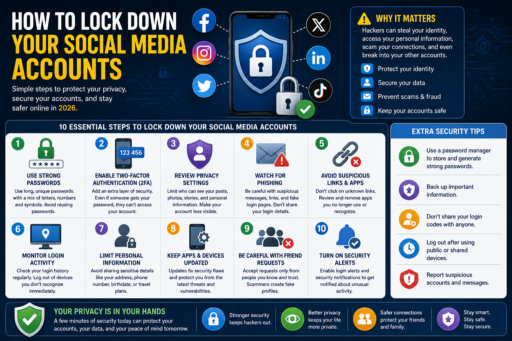
Social media accounts often contain personal information, private conversations, photos, location history, and access to connected online services. Learning how to lock down your social media accounts can help reduce phishing attacks, weak password risks, fake link scams, and identity theft attempts targeting your online identity.
Learning how to lock down your social media accounts can help improve online privacy, reduce cybersecurity risks, and protect personal information from unauthorized access.
Many people underestimate how valuable social media accounts are to cybercriminals. A compromised account may lead to scams, impersonation, financial fraud, or even access to other connected accounts.
In this beginner-friendly guide, you will learn:
- Why social media security matters
- How hackers target social accounts
- Best social media security settings
- How to improve account privacy
- Ways to prevent account hacking
- Common social media security mistakes
- How to stay safer online in 2026
What Does How to Lock Down Your Social Media Accounts Mean?
Learning how to lock down your social media accounts means improving account security, privacy settings, and cybersecurity protections to reduce hacking and identity theft risks.
Strong social media security may help protect:
- Personal information
- Private messages
- Photos and media
- Connected accounts
- Online identity
Cybersecurity awareness is becoming increasingly important for social media users.
Why How to Lock Down Your Social Media Accounts Matters
Hackers often target social media users because accounts may contain valuable personal information and connections to other online services.
Improving social media security may help:
- Reduce hacking risks
- Prevent identity theft
- Improve online privacy
- Protect connected accounts
According to the Federal Trade Commission (FTC), strong cybersecurity habits help reduce online fraud and account theft risks.
1. Use Strong and Unique Passwords
Weak passwords remain one of the most common cybersecurity risks.
Strong passwords should:
- Be long and unique
- Contain mixed characters
- Avoid personal information
- Not be reused across accounts
If you want stronger password protection, read our guide on Best Password Manager Features.
2. Enable Two-Factor Authentication
Two-factor authentication adds extra account protection beyond passwords alone.
Even if passwords become exposed, 2FA may help prevent unauthorized access.
3. Review Privacy Settings Regularly
Many social media platforms allow users to control:
- Who can view posts
- Who can send messages
- Who can find accounts
- Location sharing settings
Limiting public visibility may improve online privacy.
4. Watch for Phishing Messages
Hackers often use fake messages or login pages to steal social media credentials.
If you want to improve phishing awareness, read our article on Detect Phishing Emails Instantly.
5. Avoid Suspicious Links
Suspicious links may lead to:
- Fake login pages
- Malware downloads
- Scam websites
- Account theft attempts
Always verify links carefully before clicking.
6. Limit Third-Party App Access
Some social media accounts connect to external apps and websites.
Review connected apps regularly and remove unnecessary permissions.
7. Monitor Login Activity
Most social platforms allow users to review:
- Connected devices
- Recent login activity
- Location history
Unknown login attempts may indicate account compromise.
8. Avoid Oversharing Personal Information
Public information may help scammers and hackers target victims.
Avoid sharing:
- Home addresses
- Travel details
- Financial information
- Private identification details
Reducing oversharing may improve identity protection.
9. Keep Apps and Devices Updated
Software updates often include important security patches.
Outdated apps or devices may contain vulnerabilities.
10. Secure Your Email Account Too
Many social media accounts are connected to email addresses for password recovery.
If email accounts become compromised, hackers may gain access to social profiles.
If you want stronger online identity protection, read our guide on Protect Your Identity Online.
Common Social Media Security Mistakes
1. Reusing Passwords
Password reuse increases hacking risks significantly.
2. Ignoring Privacy Settings
Public information increases exposure risks.
3. Clicking Suspicious Links
Phishing scams often target social users.
4. Accepting Fake Friend Requests
Scammers may impersonate real people.
5. Ignoring Login Alerts
Unknown logins may indicate account compromise.
How Beginners Can Improve Social Media Security
- Use strong passwords
- Enable 2FA
- Review privacy settings
- Avoid suspicious links
- Monitor account activity
Simple cybersecurity habits may significantly improve social media safety.
Why Social Media Privacy Matters More in 2026
Social media platforms store large amounts of personal information.
Improving privacy settings may help reduce:
- Identity theft risks
- Online scams
- Unauthorized access
- Cybersecurity threats
Online privacy awareness continues becoming increasingly important.
Final Thoughts on How to Lock Down Your Social Media Accounts
Learning how to lock down your social media accounts can help users improve cybersecurity awareness, reduce hacking risks, and protect personal information online.
You do not need advanced technical knowledge to improve social media security.
Instead, focus on:
- Strong passwords
- Two-factor authentication
- Privacy settings
- Cybersecurity awareness
- Safer online habits
Most importantly, remember that small security improvements may significantly reduce social media risks over time.