
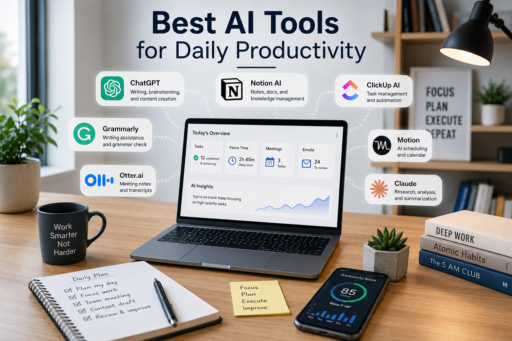
Artificial intelligence has quickly become an essential part of modern work. Tasks that once required hours of manual effort can now be completed in minutes with the help of AI-powered tools. If you’re looking for the best AI tools for daily productivity, you’ll find that these solutions can help with everything from writing emails and organizing schedules to summarizing documents and managing projects. AI is transforming how professionals work every day.
The best AI tools for daily productivity are not designed to replace human creativity or decision-making. Instead, they help eliminate repetitive tasks, improve efficiency, and allow you to spend more time on meaningful work. Whether you’re a business professional, freelancer, entrepreneur, student, or remote worker, the right AI tools can simplify your workflow while reducing stress.
Many people hesitate to adopt AI because they believe it is complicated or only useful for technology experts. Fortunately, today’s AI applications are designed to be intuitive, making it easier than ever to integrate them into your daily routine.
In this guide, you’ll discover some of the most useful AI productivity tools, practical ways to use them, and strategies for maximizing their benefits without becoming overwhelmed by technology.
Why AI Productivity Tools Matter
Modern professionals deal with an endless stream of emails, meetings, reports, documents, and administrative tasks.
Instead of spending valuable hours on repetitive work, AI tools can automate many routine activities, allowing you to focus on higher-value responsibilities.
Benefits include:
- Saving time
- Improving organization
- Reducing repetitive work
- Enhancing creativity
- Increasing productivity
- Supporting better decision-making
- Simplifying daily workflows
When used correctly, AI becomes a productivity partner rather than simply another piece of software.
Choose Tools That Solve Real Problems
One of the biggest mistakes people make is downloading dozens of AI applications they never consistently use.
Instead, identify your biggest daily challenges first.
Ask yourself:
- Do I spend too much time writing emails?
- Am I overwhelmed by meetings?
- Do I struggle to organize tasks?
- Do I frequently summarize long documents?
- Could automation reduce repetitive work?
The best AI tools for daily productivity solve specific problems instead of adding unnecessary complexity.
AI Writing Assistants
Writing assistants remain among the most popular AI productivity tools.
They can help you:
- Draft emails
- Improve grammar
- Rewrite paragraphs
- Generate ideas
- Create outlines
- Summarize information
Rather than replacing your writing, these tools accelerate the drafting process and help eliminate writer’s block.
Always review AI-generated content before publishing to ensure accuracy and maintain your personal voice.
AI Meeting Assistants
Meetings consume a large portion of many professionals’ schedules.
AI meeting assistants can:
- Record discussions
- Generate summaries
- Capture action items
- Create meeting notes
- Highlight important decisions
Instead of manually writing notes throughout every meeting, you can focus on the conversation while AI organizes the important details afterward.
AI Task Management
Many task management platforms now include AI features that help prioritize work automatically.
These systems can:
- Recommend daily priorities
- Organize projects
- Suggest deadlines
- Track progress
- Identify overdue tasks
AI-powered planning helps reduce decision fatigue while making large workloads feel more manageable.
AI Email Management
Email is one of the biggest productivity challenges for busy professionals.
AI tools can help by:
- Drafting replies
- Prioritizing messages
- Filtering low-priority emails
- Creating summaries
- Organizing inbox categories
Reducing email overload creates more time for meaningful work throughout the day.
AI Note-Taking Tools
Taking notes during meetings often divides your attention.
AI note-taking applications automatically organize conversations, identify key points, and generate searchable summaries.
This allows you to remain engaged during discussions instead of worrying about documenting every detail.
Internal Link Opportunity: Best Note-Taking Apps for Productivity
AI Research Assistants
Research often requires reviewing dozens of articles, reports, and documents.
AI research assistants can:
- Summarize lengthy documents.
- Highlight key insights.
- Compare multiple sources.
- Generate concise overviews.
- Organize research findings.
While these tools save significant time, always verify important information using reliable sources before making decisions.
AI Scheduling Tools
Managing calendars becomes increasingly difficult as responsibilities grow.
AI scheduling assistants help by:
- Finding meeting times.
- Avoiding scheduling conflicts.
- Sending reminders.
- Organizing appointments.
- Coordinating multiple calendars.
Automating scheduling reduces administrative work and minimizes back-and-forth communication.
AI for Brainstorming
Creative work often begins with generating ideas.
AI can assist with:
- Blog topic suggestions.
- Marketing ideas.
- Project planning.
- Business names.
- Presentation outlines.
- Problem-solving approaches.
Think of AI as a brainstorming partner rather than the final decision-maker.
Human judgment remains essential when evaluating ideas.
Avoid Depending Entirely on AI
Although AI tools are extremely useful, they should support your expertise rather than replace it.
Continue developing your own skills in:
- Critical thinking
- Communication
- Decision-making
- Creativity
- Leadership
The most successful professionals combine AI efficiency with human experience and judgment.
Build an AI Workflow
Instead of randomly using different AI applications throughout the day, create a simple workflow.
For example:
Morning:
- Organize priorities with AI.
- Review calendar.
- Draft emails.
Afternoon:
- Summarize meetings.
- Organize notes.
- Plan projects.
Evening:
- Review completed tasks.
- Prepare tomorrow’s schedule.
A structured workflow allows the best AI tools for daily productivity to work together more effectively while reducing unnecessary complexity.
Protect Your Privacy
Before uploading documents into any AI platform, consider:
- Company privacy policies.
- Sensitive client information.
- Financial records.
- Personal data.
- Confidential business documents.
Choose reputable AI providers and avoid sharing information that should remain private.
Internal Link Opportunity: Best Productivity Systems for Busy Professionals
Automate Repetitive Tasks
One of the greatest advantages of artificial intelligence is automation.
Instead of repeating the same manual tasks every day, AI can handle many routine activities while you focus on more valuable work.
Examples include:
- Organizing emails.
- Creating meeting summaries.
- Generating reports.
- Scheduling reminders.
- Managing recurring tasks.
- Categorizing documents.
Automation saves time while reducing repetitive mental effort.
Keep Your AI Tool Collection Simple
Many professionals install too many productivity applications.
Ironically, managing numerous tools often becomes another source of distraction.
Instead of using ten different AI applications, choose a small collection that covers your daily needs.
A practical setup might include:
- One writing assistant.
- One note-taking application.
- One task manager.
- One calendar assistant.
Simplicity usually produces better long-term productivity than constantly switching between new software.
Continue Learning New Features
Artificial intelligence evolves rapidly.
Most productivity platforms regularly introduce new capabilities that improve efficiency.
Spend a few minutes each month exploring:
- New automation features.
- Workflow improvements.
- Keyboard shortcuts.
- AI assistants.
- Collaboration tools.
Small improvements can significantly increase your productivity over time.
Combine AI With Human Judgment
Artificial intelligence generates recommendations based on patterns and available information.
However, human judgment remains essential.
Always review AI-generated:
- Reports.
- Emails.
- Presentations.
- Financial calculations.
- Research summaries.
Using AI responsibly means combining technology with your own expertise and experience.
You can also explore Google AI productivity resources to learn more about responsible AI use, privacy, and building trustworthy AI-assisted workflows.
Use AI to Reduce Decision Fatigue
Many professionals make hundreds of small decisions every day.
AI can reduce this mental workload by helping:
- Prioritize tasks.
- Recommend schedules.
- Organize information.
- Summarize documents.
- Suggest next actions.
Reducing unnecessary decisions leaves more mental energy for important work.
Track Productivity Improvements
After introducing AI into your workflow, evaluate whether it actually improves your productivity.
Ask yourself:
- Am I saving time?
- Are repetitive tasks decreasing?
- Has my work quality improved?
- Do I feel less stressed?
- Am I focusing more on high-value work?
Regular reviews ensure your AI tools continue supporting your goals.
Common Mistakes When Using AI
Many professionals unintentionally reduce productivity by misusing AI.
Common mistakes include:
- Depending entirely on AI.
- Never reviewing AI-generated content.
- Installing too many applications.
- Ignoring privacy concerns.
- Using AI without clear goals.
- Automating tasks that require personal judgment.
Avoiding these habits helps you gain the greatest value from AI while maintaining high-quality work.
Create Sustainable AI Habits
Artificial intelligence works best when it becomes part of a consistent routine.
Examples include:
Morning:
- Review priorities.
- Organize your schedule.
- Draft important emails.
Afternoon:
- Summarize meetings.
- Update projects.
- Organize research.
Evening:
- Review completed tasks.
- Prepare tomorrow’s workload.
- Organize notes.
Developing these habits allows the best AI tools for daily productivity to become reliable assistants rather than occasional conveniences.
AI Will Continue Changing the Workplace
Artificial intelligence continues evolving at an incredible pace.
Future productivity improvements will likely include:
- Smarter scheduling.
- Better workflow automation.
- More accurate research assistance.
- Improved collaboration.
- Personalized productivity recommendations.
Professionals who learn to work alongside AI will likely adapt more easily as technology continues advancing.
Choose Progress Over Perfection
Many people delay adopting AI because they want to find the perfect application before getting started.
Instead, choose one reliable tool and begin learning how it fits your workflow.
Small improvements made consistently often produce greater results than constantly searching for the ideal solution.
Learning through experience is usually more valuable than endless comparison.
Final Thoughts
The best AI tools for daily productivity are designed to help you work more efficiently without replacing your creativity, expertise, or critical thinking. They automate repetitive tasks, improve organization, and simplify daily workflows so you can focus on meaningful work instead of routine administration.
Start with one or two AI tools that solve your biggest productivity challenges, then gradually expand your workflow as you become more comfortable. This approach makes adoption easier while helping you build sustainable habits that improve long-term efficiency.
Remember that artificial intelligence is most effective when combined with human judgment. By using AI to support—not replace—your decision-making, creativity, and communication skills, you can enjoy higher productivity while maintaining the quality and accuracy of your work.
Internal Link Opportunity: Best AI Productivity Apps in 2026
Best Time Management Techniques That Work
How to Increase Productivity Without Burnout
For additional guidance on using generative AI responsibly and effectively in everyday work, you can naturally link to Google AI using the anchor text responsible AI practices in the section discussing privacy and human judgment.