
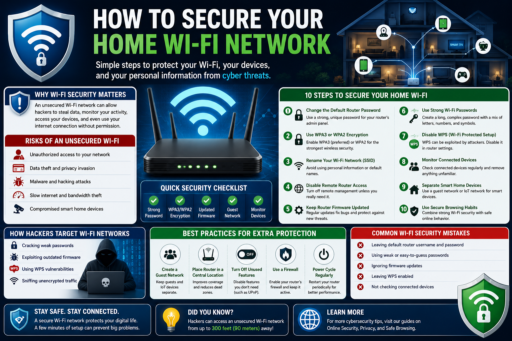
Home Wi-Fi networks connect smartphones, laptops, smart TVs, gaming consoles, security cameras, and many other internet-connected devices. Learning how to secure your home Wi-Fi network can help reduce hacking attempts, malware attacks, privacy risks, and unauthorized access to your personal devices and online accounts.
Learning how to secure your home Wi-Fi network can help improve cybersecurity, protect personal information, and reduce online security risks for everyone connected to your internet network.
Many people use default router settings without realizing that weak Wi-Fi security may create serious cybersecurity vulnerabilities.
In this beginner-friendly guide, you will learn:
- Why Wi-Fi security matters
- Common home network risks
- How hackers target Wi-Fi networks
- Best Wi-Fi security settings
- How to protect connected devices
- Common Wi-Fi security mistakes
- Ways to improve home cybersecurity
What Does How to Secure Your Home Wi-Fi Network Mean?
Learning how to secure your home Wi-Fi network means protecting your wireless internet connection from unauthorized access, cyber threats, and privacy risks.
Strong Wi-Fi security may help protect:
- Personal devices
- Online accounts
- Private information
- Smart home devices
- Internet activity
Home network security is becoming increasingly important as more devices connect to the internet every year.
Why How to Secure Your Home Wi-Fi Network Matters
Weak Wi-Fi security may allow hackers to:
- Access connected devices
- Monitor internet traffic
- Spread malware
- Steal personal information
- Use your network illegally
According to the Federal Trade Commission (FTC), strong cybersecurity habits help reduce online security risks.
1. Change the Default Router Password
Many routers use default passwords that hackers can easily guess.
Changing the administrator password is one of the first and most important security steps.
Strong passwords should:
- Be unique
- Contain mixed characters
- Avoid personal information
- Not be reused elsewhere
2. Use WPA3 or WPA2 Encryption
Wi-Fi encryption helps protect wireless data from unauthorized access.
Modern routers should use:
- WPA3 (preferred)
- WPA2 (acceptable for older routers)
Avoid outdated security methods such as WEP because they are much less secure.
3. Rename Your Wi-Fi Network Name (SSID)
Default Wi-Fi names may reveal router brands or internet providers.
Custom SSID names may help reduce targeted attacks.
Avoid using personal information in your Wi-Fi name.
4. Disable Remote Router Access
Remote router management may increase cybersecurity risks if not needed.
Disabling unnecessary remote access features may improve network security.
5. Keep Router Firmware Updated
Router firmware updates often include important security patches.
Outdated routers may contain vulnerabilities that hackers exploit.
Check router updates regularly through the router settings page.
6. Use Strong Wi-Fi Passwords
Weak Wi-Fi passwords increase unauthorized access risks.
Strong Wi-Fi passwords should:
- Be long and unique
- Contain numbers and symbols
- Avoid simple words
Strong passwords greatly improve wireless security.
7. Disable WPS if Possible
Wi-Fi Protected Setup (WPS) may create security vulnerabilities on some routers.
Disabling WPS may improve overall network security.
8. Monitor Connected Devices
Reviewing connected devices regularly may help detect:
- Unknown devices
- Unauthorized access
- Suspicious activity
Removing unknown devices may improve network safety.
9. Separate Smart Home Devices
Some smart home devices may have weaker security protections.
Using separate guest networks for smart devices may reduce cybersecurity risks.
10. Use Secure Browsing Habits
Wi-Fi security alone cannot stop all cyber threats.
How Phishing Attacks Still Affect Wi-Fi Users
Even secure Wi-Fi networks cannot fully prevent phishing scams.
How Public Wi-Fi Differs From Home Wi-Fi
Public Wi-Fi networks are usually less secure than properly protected home networks.
Home Wi-Fi security gives users greater control over:
- Passwords
- Encryption
- Connected devices
- Privacy settings
Common Home Wi-Fi Security Mistakes
1. Keeping Default Passwords
Default credentials increase hacking risks.
2. Ignoring Router Updates
Outdated firmware may contain vulnerabilities.
3. Using Weak Wi-Fi Passwords
Weak passwords make unauthorized access easier.
4. Leaving WPS Enabled
WPS may create unnecessary security risks.
5. Ignoring Unknown Devices
Unknown connections may indicate unauthorized access.
How Beginners Can Improve Wi-Fi Security
- Use strong passwords
- Enable WPA3 or WPA2 encryption
- Keep firmware updated
- Monitor connected devices
- Practice safer browsing habits
Simple cybersecurity habits may significantly improve home network protection.
Why Home Network Security Matters More in 2026
More devices are connected to home networks than ever before.
Improving Wi-Fi security may help reduce:
- Cybersecurity risks
- Privacy threats
- Unauthorized access
- Malware exposure
Home cybersecurity awareness is becoming increasingly important.
Related Articles
Final Thoughts on How to Secure Your Home Wi-Fi Network
Learning how to secure your home Wi-Fi network can help users improve online safety, reduce cybersecurity risks, and protect connected devices from unauthorized access.
You do not need advanced technical knowledge to improve Wi-Fi security.
Instead, focus on:
- Strong passwords
- Updated firmware
- Secure encryption
- Monitoring devices
- Cybersecurity awareness
Most importantly, remember that small security improvements may greatly improve home network safety over time.