
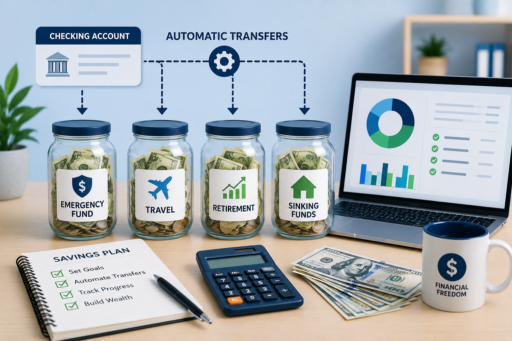
If you want to automate your savings step by step, you are making one of the smartest financial decisions possible. Automation removes the need for constant willpower and helps you build wealth consistently without thinking about it every month.
Many people intend to save money, but they wait until the end of the month to see what is left. Unfortunately, there is often little or nothing remaining. As a result, savings goals are delayed and financial progress feels slow.
The solution is simple: automate the process. By setting up recurring transfers, you can save money before you have a chance to spend it. Over time, this small change can transform your financial future.
In this complete guide, you will learn exactly how to automate your savings step by step, choose the right accounts, set realistic goals, and create a system that works in 2026 and beyond.
To strengthen your overall financial plan, you may also want to read Best Monthly Budget Template for Beginners (2026), Zero-Based Budgeting for Beginners (2026 Guide), Best Sinking Funds to Start in 2026, and How to Stop Living Paycheck to Paycheck in 2026.
Why Saving Money Is Hard Without Automation
Manual saving depends on motivation and discipline. However, motivation changes from month to month. Automation removes this uncertainty by making saving automatic and consistent.
According to the Consumer Financial Protection Bureau, setting up automatic transfers is one of the most effective ways to build savings and improve financial stability.
What Does It Mean to Automate Your Savings?
Automating your savings means scheduling recurring transfers from your checking account to one or more savings accounts without manual action.
Once the system is in place, money moves automatically according to your plan.
Main Benefits of Automated Savings
- Builds consistency
- Removes emotional decisions
- Reduces overspending
- Accelerates goal achievement
- Creates financial discipline
- Reduces money stress
Step 1: Define Your Savings Goals
Before automating anything, decide what you are saving for.
- Emergency fund
- Travel
- Home purchase
- Retirement
- Car replacement
- Education
Step 2: Open the Right Savings Account
A dedicated savings account helps separate your goals from everyday spending.
Step 3: Decide How Much to Save
Start with an amount you can sustain consistently, even if it is only $25 or $50 per month.
Step 4: Schedule Automatic Transfers
Set transfers to occur on payday or immediately afterward.
Step 5: Pay Yourself First
Treat savings as a fixed expense rather than an optional leftover.
Step 6: Create Multiple Savings Buckets
Separate accounts or categories can help organize different financial goals.
Step 7: Use Sinking Funds
Automating sinking funds prepares you for irregular expenses like travel, holidays, and insurance premiums.
Step 8: Increase Contributions Gradually
Raise your automated transfers whenever your income grows.
Step 9: Review Progress Monthly
Track balances and adjust contributions as your goals evolve.
Step 10: Stay Consistent
Consistency matters more than starting with a large amount.
Example of Automated Savings Growth
| Monthly Savings | One Year | Five Years |
|---|---|---|
| $100 | $1,200 | $6,000 |
| $250 | $3,000 | $15,000 |
| $500 | $6,000 | $30,000 |
How Automation Helps You Stop Living Paycheck to Paycheck
Automated savings build a financial buffer that gradually reduces dependence on your next paycheck.
Best Goals to Automate First
- Starter emergency fund
- Insurance premiums
- Travel savings
- Holiday gifts
- Retirement contributions
How to Automate Savings with Irregular Income
If your income fluctuates, automate a conservative baseline amount and increase contributions during higher-income months.
Best Tools for Automated Savings
- Online banking transfers
- Automatic payroll deductions
- Budgeting apps
- Investment platforms
How to Automate Multiple Financial Goals
Once you understand how to automate your savings step by step, you can create separate automatic transfers for several goals at the same time.
- Emergency fund
- Vacation savings
- Home down payment
- Retirement contributions
- Sinking funds
- Investment accounts
Even small automatic transfers can produce significant results over time.
How to Choose the Best Transfer Schedule
Most people schedule transfers on payday. This approach ensures savings happen before discretionary spending begins.
Common schedules include:
- Weekly
- Biweekly
- Twice per month
- Monthly
How to Build an Emergency Fund Automatically
Start by automating contributions to a starter emergency fund of $500 to $1,000. After reaching that goal, continue until you have three to six months of living expenses.
How to Use Automation with Zero-Based Budgeting
Zero-based budgeting and automated savings work exceptionally well together. Every dollar is assigned a purpose, and savings contributions happen automatically according to your plan.
How to Automate Sinking Funds
Sinking funds are ideal candidates for automation because they involve predictable future expenses such as insurance, holidays, and travel.
Common Mistakes to Avoid
- Saving too much too quickly
- Ignoring cash flow needs
- Failing to review progress
- Using savings for non-essential spending
- Stopping after one setback
Psychological Benefits of Automated Savings
Automation reduces decision fatigue and makes financial progress feel effortless.
- Less stress
- Greater confidence
- Improved discipline
- Stronger habits
- Faster goal achievement
How Families Can Benefit from Automated Savings
Families can automate multiple goals simultaneously, including education, travel, home maintenance, and emergency savings.
How Freelancers Can Automate Savings
Freelancers should automate tax savings, emergency funds, and business reserves to create greater stability despite variable income.
How Students Can Start Saving Automatically
Students can build powerful habits by automating even small amounts such as $10 or $20 per week.
How Technology Improves Financial Security
Modern banking and budgeting tools make it easier than ever to automate savings and monitor progress securely.
For additional financial security, read:
- Protect Your Online Payments From Fraud (2026 Guide)
- Manage Passwords Securely Without Forgetting Them (2026)
- Secure Your Files on Cloud Storage (Google Drive & More) 2026
30-Day Automated Savings Challenge
- Choose one savings goal.
- Open a dedicated savings account.
- Set a realistic monthly amount.
- Schedule an automatic transfer.
- Track progress weekly.
- Increase contributions gradually.
- Review and refine monthly.
Frequently Asked Questions
What is the best way to automate savings?
The most effective method is to schedule automatic transfers immediately after each payday.
How much should I automate?
Start with any amount you can maintain consistently.
Can I automate multiple savings goals?
Yes. Separate accounts or categories make this process easy.
What if my income is irregular?
Automate a conservative baseline and add more during higher-income months.
How often should I review my savings plan?
Monthly reviews are usually sufficient.
Final Thoughts
Learning how to automate your savings step by step is one of the most effective ways to build wealth and achieve financial stability.
By defining clear goals, opening the right accounts, scheduling automatic transfers, and reviewing progress regularly, you can make saving money almost effortless.
Whether you are building an emergency fund, preparing for travel, funding sinking funds, or investing for retirement, automation helps you stay consistent and focused.
Remember, financial success is often the result of simple systems repeated over time. Automation ensures that your money works for you even when life becomes busy.
Start with one automatic transfer today. Over time, this small decision can transform your financial future in 2026 and beyond.