
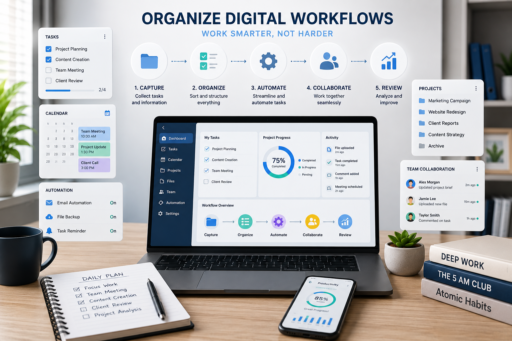
Digital tools have transformed the way we work, making it easier to communicate, collaborate, and manage projects from virtually anywhere. However, as the number of apps, files, emails, and online platforms continues to grow, many professionals want to know how to organize digital workflows efficiently because they find themselves spending more time searching for information than actually completing meaningful work.
Learning how to organize digital workflows efficiently is essential for improving productivity and reducing unnecessary stress. An organized digital workflow allows you to move smoothly between tasks, locate important information quickly, automate repetitive processes, and collaborate more effectively with colleagues or clients.
Many people assume they need expensive software or complicated systems to stay organized. In reality, efficient workflows are built on simple habits, consistent routines, and well-structured processes. Whether you work from home, manage a business, or collaborate with a remote team, improving your digital organization can save hours every week.
In this guide, you’ll learn practical strategies for organizing your digital workspace, streamlining repetitive tasks, and building workflows that improve efficiency without adding unnecessary complexity.
Why Digital Workflows Matter
Every digital task is connected to a larger process.
Responding to emails, editing documents, attending meetings, sharing files, and tracking projects all become easier when they follow an organized workflow.
An efficient digital workflow helps you:
- Reduce wasted time.
- Improve collaboration.
- Find files quickly.
- Minimize repetitive work.
- Reduce errors.
- Stay organized.
- Improve long-term productivity.
Instead of constantly reacting to incoming work, you follow a structured process that supports consistent results.
Identify Your Daily Workflow
Before making improvements, understand how your current workflow operates.
Ask yourself:
- Which tasks do I repeat every day?
- Where do delays usually occur?
- Which apps do I use most often?
- What consumes unnecessary time?
- Which tasks could be automated?
Understanding your existing routine makes it easier to identify opportunities for improvement.
Simplify Your Digital Workspace
A cluttered desktop, overloaded downloads folder, and disorganized cloud storage create unnecessary frustration.
Start by:
- Removing outdated files.
- Deleting duplicate documents.
- Organizing folders logically.
- Archiving completed projects.
- Cleaning your desktop regularly.
Learning how to organize digital workflows efficiently often begins with creating a cleaner digital environment.
Create a Consistent Folder Structure
Every important file should have a predictable location.
For example:
Projects
- Client A
- Client B
- Marketing
- Finance
- Templates
- Archive
Within each project, maintain the same folder structure whenever possible.
Consistency makes finding documents significantly faster.
Use Clear File Naming Conventions
Generic file names like:
- Final.pdf
- Report2.docx
- New Version.xlsx
quickly become confusing.
Instead, use descriptive names such as:
- Marketing_Report_Q2_2026.pdf
- ClientA_ProjectProposal.docx
- MonthlyBudget_June2026.xlsx
A standardized naming system improves organization while reducing mistakes.
Reduce App Switching
Constantly moving between different applications interrupts concentration.
Whenever possible:
- Use integrated tools.
- Combine related tasks.
- Close unnecessary tabs.
- Organize frequently used applications together.
Reducing app switching improves focus while saving valuable time.
Organize Your Email Workflow
Email often becomes one of the biggest sources of digital clutter.
Create a simple workflow by:
- Checking email at scheduled times.
- Using folders or labels.
- Archiving completed conversations.
- Deleting unnecessary messages.
- Unsubscribing from unwanted newsletters.
A cleaner inbox reduces distractions throughout the workday.
Automate Repetitive Processes
Many repetitive digital tasks can be automated.
Examples include:
- Calendar reminders.
- File backups.
- Email filters.
- Task creation.
- Document templates.
- Cloud synchronization.
Automation allows you to spend more time on meaningful work instead of repetitive administration.
Standardize Your Daily Routine
Successful professionals often follow the same digital workflow each day.
Morning:
- Review priorities.
- Check calendar.
- Organize tasks.
Afternoon:
- Meetings.
- Project work.
- Email processing.
Evening:
- Update projects.
- Organize files.
- Prepare tomorrow’s schedule.
Consistency improves both speed and accuracy.
Store Information in One Place
Many people waste valuable time searching across emails, cloud drives, messaging apps, and local folders.
Choose one primary location for important documents whenever possible.
Centralized information reduces confusion while making collaboration easier.
Review Your Workflow Regularly
Digital workflows should evolve as your responsibilities change.
Every month, ask yourself:
- Which steps waste time?
- What could be automated?
- Which software no longer serves my needs?
- Are my files easy to find?
- Is my workflow still efficient?
Small improvements often create significant productivity gains over time.
Many professionals improve these routines alongside Best Productivity Systems for Busy Professionals, creating a more structured and consistent approach to managing daily responsibilities.
Protect Important Data
An organized workflow also includes protecting valuable information.
Regularly:
- Back up files.
- Enable two-factor authentication.
- Use strong passwords.
- Update software.
- Secure cloud storage.
Good organization includes both productivity and digital security.
Many users combine these habits with Best Cloud Storage Apps for Secure Backups to keep important documents organized, accessible, and protected across multiple devices.
Use Task Management Systems Consistently
Even the most organized workflow can become chaotic without a reliable task management system.
Whether you use a digital planner, project management platform, or simple to-do list, consistency is far more important than complexity.
Your task manager should help you:
- Organize priorities.
- Track deadlines.
- Monitor project progress.
- Separate urgent work from long-term goals.
- Reduce forgotten tasks.
Learning how to organize digital workflows efficiently becomes much easier when every task has a clear place within your daily workflow.
Keep Browser Tabs Under Control
Many professionals work with dozens of browser tabs open at the same time.
Although this feels productive, it often creates unnecessary distractions and makes it difficult to find important information.
Instead:
- Close tabs you no longer need.
- Bookmark frequently used websites.
- Group related tabs together.
- Use separate browser profiles for different projects if necessary.
A cleaner browser improves focus while reducing digital clutter.
Document Repeatable Processes
If you perform the same task every week, document the process.
Examples include:
- Client onboarding.
- Monthly reporting.
- Content publishing.
- Invoice preparation.
- Social media scheduling.
Creating simple checklists and templates reduces mistakes while making repetitive work faster and easier.
Collaborate More Effectively
Efficient workflows become even more valuable when working with others.
Establish clear rules for:
- File sharing.
- Version control.
- Project updates.
- Communication channels.
- Task assignments.
Well-organized collaboration reduces misunderstandings while improving overall team productivity.
Reduce Digital Distractions
Modern technology creates constant interruptions.
Notifications from email, messaging apps, social media, and project management tools quickly break concentration.
Consider:
- Turning off unnecessary notifications.
- Scheduling specific times to check messages.
- Using focus mode during deep work.
- Silencing non-essential applications.
Reducing distractions allows you to complete important work more efficiently.
Create Weekly Workflow Reviews
Successful professionals regularly evaluate how well their systems are working.
Each week, review:
- Completed projects.
- Outstanding tasks.
- File organization.
- Calendar commitments.
- Automation opportunities.
Regular reviews help you identify small improvements before inefficiencies become larger problems.
Avoid Overcomplicating Your Workflow
Many people assume that adding more software automatically improves productivity.
In reality, unnecessary complexity often slows everything down.
Choose tools that genuinely solve problems instead of adding features you rarely use.
Simple workflows are usually easier to maintain and improve over time.
Build Habits That Support Organization
Strong digital workflows depend on consistent habits.
Useful habits include:
- Cleaning your desktop every Friday.
- Reviewing your downloads folder weekly.
- Backing up important files automatically.
- Updating project folders daily.
- Reviewing tomorrow’s priorities before finishing work.
These small routines prevent digital clutter from accumulating.
Common Workflow Mistakes
Even experienced professionals sometimes create unnecessary inefficiencies.
Common mistakes include:
- Saving files in random locations.
- Using inconsistent file names.
- Ignoring software updates.
- Switching between too many applications.
- Never deleting outdated documents.
- Working without standardized processes.
- Failing to review completed projects.
Recognizing these habits allows you to build a more efficient digital environment.
Continue Improving Your Digital Systems
Technology changes constantly.
New tools, automation features, and collaboration platforms appear every year.
Rather than completely rebuilding your workflow, focus on gradual improvements.
Ask yourself:
- Which process wastes the most time?
- What could be simplified?
- Which repetitive tasks could be automated?
- Which tools actually improve productivity?
Continuous improvement helps your workflow remain efficient as your responsibilities grow.
Many professionals strengthen these habits alongside Best AI Tools for Daily Productivity, allowing automation and organization to work together more effectively.
Final Thoughts
Learning how to organize digital workflows efficiently is not about creating a perfect system from the beginning. It is about building simple, repeatable processes that reduce unnecessary work, improve organization, and help you focus on meaningful priorities.
Start by organizing your files, simplifying your digital workspace, reducing distractions, and documenting repetitive processes. As these habits become part of your daily routine, your workflow will become faster, more reliable, and easier to maintain.
Remember that the most effective digital workflows evolve over time. Continue reviewing your systems, making small improvements, and adopting tools that genuinely support your work. By combining organization, automation, and consistent habits, you can create a workflow that saves time, reduces stress, and supports long-term productivity.
Many professionals also improve their efficiency by integrating these practices with Best Time Management Techniques That Work and Best AI Productivity Apps in 2026, creating a complete productivity system that supports both organization and consistent performance.
For additional guidance on workflow automation, digital collaboration, and productivity best practices, you can naturally link to Microsoft Productivity using the anchor text digital productivity resources when discussing continuous workflow improvement.