
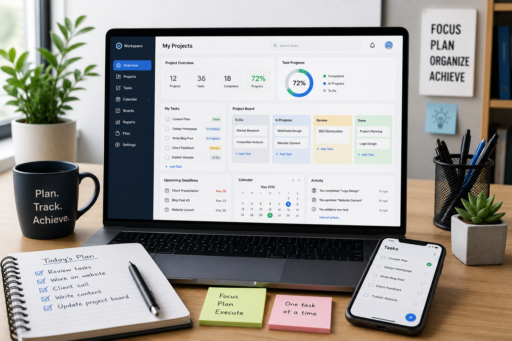
Managing personal projects has become more challenging than ever. Whether you’re a freelancer, entrepreneur, student, content creator, or full-time professional, keeping track of deadlines, ideas, tasks, and long-term goals can quickly become overwhelming without the right system. That’s why finding the Best Project Management Tools for Individuals is essential to stay organized and productive.
The best project management tools for individuals help organize responsibilities, simplify planning, and provide a clear overview of everything that needs to be accomplished. Instead of relying on scattered notes, multiple spreadsheets, or memory alone, these tools create a centralized workspace where projects remain organized and easy to manage.
Many people assume project management software is designed only for large businesses or corporate teams. In reality, many modern platforms offer simple, flexible features that are perfect for individuals who want to stay organized without unnecessary complexity.
In this guide, you’ll learn how personal project management tools improve productivity, what features matter most, and how to choose the right solution for your workflow.
Why Individuals Need Project Management Tools
Even if you work alone, you’re likely managing multiple projects at the same time.
For example:
- Client work
- Personal goals
- Content creation
- Learning new skills
- Financial planning
- Household responsibilities
- Side businesses
Without an organized system, it’s easy to lose track of priorities or miss important deadlines.
The best project management tools for individuals provide structure that makes daily planning significantly easier.
Centralize All Your Tasks
One of the biggest productivity mistakes is keeping information in multiple places.
Some tasks live in email.
Others remain inside notebooks.
Additional reminders stay on your phone.
Instead, store everything in one trusted system.
Centralizing your work makes it easier to:
- Track progress.
- Review deadlines.
- Find project information.
- Prioritize important tasks.
- Reduce mental overload.
Having one reliable workspace saves time while reducing unnecessary stress.
Break Large Projects Into Smaller Tasks
Large goals often feel intimidating because they lack clear starting points.
Project management tools allow you to divide complex work into manageable steps.
For example:
Website Launch
- Research
- Design
- Content writing
- SEO
- Testing
- Publishing
Completing smaller tasks consistently creates steady progress while reducing procrastination.
Organize Projects by Priority
Not every project deserves equal attention.
Create categories such as:
- High Priority
- Medium Priority
- Low Priority
- Waiting
- Completed
Visual organization helps you focus on work that delivers the greatest impact.
Track Deadlines Clearly
Missing deadlines often happens because responsibilities become scattered.
Good project management software provides:
- Due dates
- Calendar views
- Reminder notifications
- Progress tracking
- Recurring tasks
Knowing exactly what needs attention each day reduces uncertainty and improves planning.
Keep Project Notes Together
Every project generates valuable information.
Instead of creating separate documents, attach notes directly to related tasks whenever possible.
Include:
- Meeting summaries
- Research
- Links
- Ideas
- Checklists
- Reference documents
Keeping everything together makes future updates much easier.
Use Visual Project Boards
Many people process information more effectively when they can see project progress visually.
Kanban boards, for example, often include columns such as:
- To Do
- In Progress
- Review
- Completed
Moving tasks between stages provides a clear picture of overall progress while increasing motivation.
Avoid Overcomplicating Your Workflow
Some people spend more time organizing projects than actually completing them.
Keep your system simple.
Focus on:
- Important tasks.
- Real deadlines.
- Useful notes.
- Clear priorities.
The best project management tools for individuals should simplify your work rather than create additional administrative tasks.
Create Daily Project Reviews
Spend five minutes every morning reviewing:
- Today’s priorities.
- Upcoming deadlines.
- Outstanding tasks.
- Project progress.
Likewise, spend a few minutes each evening preparing for the following day.
These small reviews help maintain momentum while preventing important tasks from being forgotten.
Automate Routine Project Tasks
Many project management platforms support simple automation.
Examples include:
- Recurring weekly tasks.
- Automatic reminders.
- Status updates.
- Deadline notifications.
- Calendar synchronization.
Automation reduces repetitive work while keeping projects moving consistently.
Integrate Your Favorite Productivity Tools
Many modern project management platforms connect with:
- Calendar applications.
- Cloud storage.
- Note-taking software.
- Email services.
- Communication tools.
Connecting these systems reduces manual work while improving workflow efficiency.
Many professionals combine these integrations with Best AI Tools for Daily Productivity to automate repetitive tasks and streamline project planning even further.
Protect Important Project Information
Projects often contain valuable information.
Protect your data by:
- Backing up important files.
- Using strong passwords.
- Enabling two-factor authentication.
- Limiting unnecessary access.
- Keeping software updated.
A secure workflow is just as important as an organized one.
Many individuals also rely on Best Cloud Storage Apps for Secure Backups to ensure project files remain protected and accessible across all their devices.
Choose Features That Match Your Needs
Not every project management application offers the same experience.
Before choosing a tool, consider which features you actually need.
Helpful features include:
- Task lists
- Calendar view
- Kanban boards
- Progress tracking
- Recurring tasks
- Notes and attachments
- Mobile access
- Cloud synchronization
Selecting features that match your workflow keeps your system simple and effective.
Keep Your Project Dashboard Clean
A cluttered dashboard quickly becomes overwhelming.
Review your projects regularly and:
- Archive completed work.
- Delete outdated tasks.
- Update project statuses.
- Remove duplicate reminders.
- Reorganize priorities.
A clean dashboard makes it easier to focus on current responsibilities instead of outdated information.
Build Consistent Planning Habits
Project management tools become valuable only when used consistently.
Create simple habits such as:
Morning:
- Review today’s priorities.
- Check upcoming deadlines.
- Update important projects.
Afternoon:
- Complete focused work sessions.
- Update project progress.
- Organize notes.
Evening:
- Review completed tasks.
- Prepare tomorrow’s schedule.
- Archive finished work.
These routines keep projects moving forward without requiring major effort.
Avoid Managing Too Many Projects Simultaneously
Working on too many projects at once divides your attention and often slows progress.
Instead, identify:
- Your highest-priority project.
- One or two secondary projects.
- Lower-priority work that can wait.
Focusing your energy on fewer priorities usually produces better results than trying to make progress everywhere at once.
Review Progress Weekly
Every week, spend time reviewing:
- Completed milestones.
- Upcoming deadlines.
- Delayed tasks.
- Project priorities.
- Long-term goals.
Weekly reviews help you identify obstacles before they become larger problems.
Collaborate Easily When Needed
Even individual projects sometimes require collaboration with clients, freelancers, or business partners.
Good project management tools make it easy to:
- Share files.
- Assign responsibilities.
- Leave comments.
- Track updates.
- Monitor project progress.
These features simplify communication without creating unnecessary complexity.
Reduce Decision Fatigue
One hidden benefit of organized project management is reducing the number of daily decisions you need to make.
Instead of wondering what to work on next, your project dashboard clearly identifies your highest priorities.
Reducing decision fatigue helps you maintain focus while improving long-term productivity.
Common Project Management Mistakes
Many individuals unintentionally reduce productivity by creating overly complicated systems.
Some common mistakes include:
- Creating unnecessary projects.
- Never updating task status.
- Ignoring due dates.
- Using too many productivity apps.
- Forgetting weekly reviews.
- Keeping duplicate task lists.
- Failing to archive completed work.
Avoiding these habits makes your project management system much easier to maintain.
Improve Your Workflow Gradually
You don’t need to build a perfect project management system immediately.
Start with:
- One workspace.
- Clear priorities.
- Simple task lists.
- Weekly reviews.
As your responsibilities grow, gradually introduce additional features that genuinely improve your workflow.
Many professionals also improve their organization by combining these systems with Best Productivity Systems for Busy Professionals, creating a structured daily workflow that keeps projects and priorities aligned.
Focus on Consistency Instead of Perfection
The most effective project management system is the one you consistently use.
It doesn’t need hundreds of advanced features.
It simply needs to help you:
- Stay organized.
- Meet deadlines.
- Track progress.
- Reduce stress.
- Complete meaningful work.
Consistency always creates better long-term results than constantly switching between different productivity systems.
Final Thoughts
The best project management tools for individuals make it easier to organize tasks, manage deadlines, and maintain steady progress across multiple responsibilities. Whether you’re managing personal goals, freelance projects, business ideas, or everyday responsibilities, the right system helps reduce stress while improving productivity.
Start with a simple workflow that includes clear priorities, organized tasks, and regular project reviews. As your confidence grows, gradually explore additional features such as automation, calendar integration, and workflow customization to further improve efficiency.
Remember that successful project management is not about using the most advanced software. It is about building habits that help you stay organized, make consistent progress, and focus on the work that matters most.
Many users also strengthen their productivity by combining project management with Best Time Management Techniques That Work and Best AI Productivity Apps in 2026, creating a complete system for planning, organization, and long-term success.
For additional guidance on project planning, productivity, and effective work management, you can naturally link to Microsoft Planner using the anchor text project planning resources when discussing workflow improvement and project organization.