
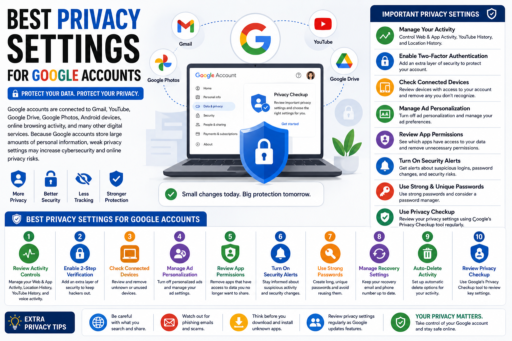
Google accounts are connected to Gmail, YouTube, Google Drive, Google Photos, Android devices, online browsing activity, and many other digital services. Learning about the best privacy settings for Google accounts can help users reduce cybersecurity risks, improve online privacy, and protect sensitive personal information from unnecessary tracking and unauthorized access.
Learning about the best privacy settings for Google accounts can help users improve digital privacy, reduce tracking risks, and protect personal information more effectively in 2026.
Many users never review their Google privacy settings after creating an account. However, understanding and adjusting these settings may significantly improve online safety and data protection.
In this beginner-friendly guide, you will learn:
- Why Google privacy settings matter
- Important Google privacy controls
- How to reduce data tracking
- Ways to improve account security
- How to manage personal information
- Common Google privacy mistakes
- How to stay safer online in 2026
What Does Best Privacy Settings for Google Accounts Mean?
Learning about the best privacy settings for Google accounts means understanding which account settings help reduce unnecessary data collection, improve online privacy, and strengthen account protection.
Google accounts may store:
- Search history
- Location activity
- YouTube activity
- Browsing information
- Connected devices
- Personal account data
Privacy settings help users control how this information is managed.
Why Best Privacy Settings for Google Accounts Matters
Strong privacy settings may help users:
- Reduce tracking risks
- Protect personal information
- Improve cybersecurity
- Limit unnecessary data exposure
According to the Federal Trade Commission (FTC), privacy awareness and strong security habits help reduce online risks.
1. Review Google Activity Controls
Google allows users to manage:
- Web activity
- App activity
- YouTube history
- Location history
Disabling unnecessary tracking may improve online privacy significantly.
2. Enable Two-Factor Authentication
Two-factor authentication adds extra account protection beyond passwords alone.
Even if passwords become exposed, 2FA may help prevent unauthorized access.
If you want stronger password protection, read our guide on Best Password Manager Features.
3. Check Connected Devices
Google accounts allow users to review:
- Connected phones
- Laptops
- Tablets
- Recent login activity
Unknown devices may indicate unauthorized access attempts.
4. Manage Ad Personalization Settings
Google uses account activity for personalized advertising.
Users may reduce tracking by reviewing:
- Ad preferences
- Personalized ads
- Interest categories
Managing ad settings may improve privacy controls.
5. Review App Permissions
Some apps connected to Google accounts may access:
- Email information
- Google Drive files
- Contacts
- Calendar data
Removing unnecessary permissions may reduce privacy risks.
6. Turn On Security Alerts
Security alerts help users detect:
- Suspicious logins
- Password changes
- Unknown devices
- Security risks
Early warnings may help users respond faster to cybersecurity threats.
7. Use Strong and Unique Passwords
Weak passwords increase cybersecurity risks significantly.
Strong passwords should:
- Be long and unique
- Contain mixed characters
- Avoid personal information
Strong password habits improve account security greatly.
8. Review Privacy Checkup Tools
Google provides privacy review tools that help users understand and adjust account settings.
Regular privacy reviews may improve online safety.
9. Monitor Recovery Settings
Recovery email addresses and phone numbers are important for account protection.
Users should review recovery settings regularly to prevent unauthorized changes.
10. Watch for Phishing Emails
Hackers often target Google accounts through phishing scams.
If you want to improve phishing awareness, read our article on Detect Phishing Emails Instantly.
Common Google Privacy Mistakes
1. Ignoring Privacy Settings
Default settings may collect more data than expected.
2. Using Weak Passwords
Weak passwords increase account hacking risks.
3. Ignoring Security Alerts
Suspicious login warnings should never be ignored.
4. Leaving Old Devices Connected
Unused devices may increase security risks.
5. Allowing Too Many App Permissions
Excessive permissions may expose unnecessary personal information.
How Beginners Can Improve Google Account Privacy
- Enable 2FA
- Review activity settings
- Use strong passwords
- Monitor connected devices
- Review app permissions regularly
Simple privacy habits may significantly improve online safety.
Why Google Privacy Matters More in 2026
Google accounts are connected to many important digital services and personal data.
Improving privacy settings may help reduce:
- Tracking risks
- Unauthorized access
- Privacy exposure
- Cybersecurity threats
Privacy awareness continues becoming increasingly important.
Related Articles
- How to Protect Children Online
- Check if Your Email Was Hacked
- How to Build Wealth Slowly but Consistently
Final Thoughts on Best Privacy Settings for Google Accounts
Learning about the best privacy settings for Google accounts can help users improve online privacy, strengthen account security, and reduce cybersecurity risks.
You do not need advanced technical knowledge to improve Google account protection.
Instead, focus on:
- Strong passwords
- Two-factor authentication
- Privacy controls
- Monitoring account activity
- Cybersecurity awareness
Most importantly, remember that small privacy improvements may greatly improve online safety over time.