
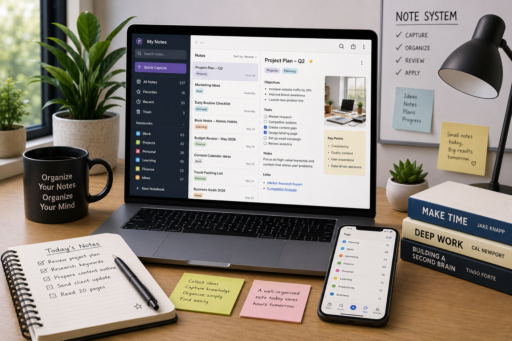
Good ideas can appear at any moment. You might think of a solution during a meeting, discover useful information while reading, or have an important reminder while traveling. Using the Best Note Organization Systems can ensure that many valuable ideas don’t disappear simply because they are never organized properly.
The best note organization systems help transform scattered information into an organized knowledge base that is easy to search, review, and use. Instead of storing notes across notebooks, random documents, sticky notes, messaging apps, and email drafts, an effective system keeps everything in one structured location.
Many professionals, students, entrepreneurs, and content creators take hundreds or even thousands of notes every year. However, collecting information is only the first step. Real productivity comes from being able to quickly find, connect, and apply your notes whenever you need them.
In this guide, you’ll learn practical note organization strategies that improve productivity, reduce digital clutter, and help you build a reliable personal knowledge system.
Why Organized Notes Matter
Taking notes is easy.
Finding the right note six months later is much more difficult.
Without organization, valuable information becomes buried inside dozens of notebooks, folders, or applications.
A structured note system helps you:
- Find information quickly.
- Reduce duplicate notes.
- Improve learning.
- Organize research.
- Capture new ideas.
- Plan projects efficiently.
- Increase productivity.
The goal isn’t simply collecting information—it’s making knowledge easy to access when you need it.
Keep Everything in One Primary System
One of the biggest mistakes people make is storing notes in too many different places.
For example:
- Paper notebooks
- Email drafts
- Messaging apps
- Sticky notes
- Word documents
- Phone notes
- Cloud documents
Instead, choose one primary note management system.
Keeping everything together reduces confusion and makes searching dramatically easier.
The best note organization systems focus on consistency rather than complexity.
Organize Notes by Categories
Creating broad categories helps you locate information faster.
Examples include:
- Work
- Personal
- Finance
- Health
- Learning
- Business
- Travel
- Projects
Within each category, you can create smaller sections as your collection grows.
Simple organization often works better than highly complicated folder structures.
Create Meaningful Titles
Titles should clearly describe what each note contains.
Instead of writing:
- Ideas
- Meeting
- Notes
- Research
Try using descriptive titles like:
- Marketing Ideas for Summer Campaign
- Weekly Client Meeting – June 2026
- Investment Research Notes
- Content Calendar Planning
Specific titles make searching much faster.
Keep One Idea Per Note
Combining unrelated topics into a single document creates confusion.
Instead, create one note for each topic.
This approach provides several benefits:
- Easier searching.
- Better organization.
- Simpler editing.
- Improved linking between notes.
Smaller notes are usually much easier to manage than extremely long documents covering multiple subjects.
Use Consistent Tags
Tags provide another layer of organization beyond folders.
Examples include:
- Productivity
- Marketing
- Finance
- AI
- Writing
- Business
- Personal Development
Using consistent tags allows related information to appear together even when notes belong to different folders.
Review Notes Regularly
Notes become much more valuable when reviewed.
Schedule time each week to:
- Remove outdated information.
- Update existing notes.
- Organize new ideas.
- Archive completed projects.
- Combine duplicate information.
Regular maintenance prevents your knowledge system from becoming cluttered.
Connect Related Information
Many valuable ideas become stronger when connected.
For example:
A productivity note may link to:
- Time management
- Daily routines
- Project planning
- AI productivity tools
Connecting information creates a network of knowledge instead of isolated documents.
Many professionals strengthen this approach by using Best AI Tools for Daily Productivity to organize, summarize, and categorize notes more efficiently.
Capture Ideas Immediately
Good ideas rarely arrive at convenient times.
Instead of trusting your memory, capture information immediately.
Useful examples include:
- Voice notes.
- Mobile note apps.
- Quick capture widgets.
- Pocket notebooks.
Even short notes can become valuable later when properly organized.
Separate Active and Archived Notes
Not every note requires constant attention.
Create two primary sections:
Active
- Current projects
- Ongoing research
- Daily planning
Archive
- Completed projects
- Old meeting notes
- Finished courses
- Historical references
Separating active work from archived material keeps your workspace clean while preserving valuable information.
Keep Formatting Simple
Many people spend excessive time designing beautiful notes.
Instead, prioritize readability.
Use:
- Clear headings.
- Bullet points.
- Short paragraphs.
- Numbered lists.
- Bold text for important ideas.
Simple formatting makes reviewing notes significantly faster.
Build a Personal Knowledge Library
Your notes should become a long-term resource rather than temporary reminders.
Over time, you’ll build a searchable collection of:
- Lessons learned.
- Research.
- Checklists.
- Business ideas.
- Project documentation.
- Personal reflections.
This knowledge library becomes increasingly valuable every year.
Many individuals combine these systems with Best Project Management Tools for Individuals to organize projects and supporting documentation in one structured workflow.
Protect Your Notes
Your notes often contain valuable personal and professional information.
Protect them by:
- Using cloud backups.
- Enabling two-factor authentication.
- Choosing strong passwords.
- Synchronizing across devices.
- Backing up important notebooks regularly.
Many users also rely on Best Cloud Storage Apps for Secure Backups to protect their notes while keeping them accessible from multiple devices.
Create a Simple Daily Note Routine
Even the most organized note system becomes difficult to manage if you rarely maintain it.
Spend a few minutes each day to:
- Review new notes.
- Organize recently captured ideas.
- Add missing tags.
- Move completed notes to the correct folders.
- Archive outdated information.
Small daily maintenance prevents your note collection from becoming overwhelming.
Learning best note organization systems becomes much easier when organization is part of your daily routine rather than an occasional cleanup project.
Use Search Before Creating New Notes
Many people accidentally create duplicate notes because they forget information they’ve already saved.
Before creating a new note:
- Search your existing library.
- Check related categories.
- Review previous meeting notes.
- Look for similar ideas.
Avoiding duplicates keeps your knowledge base organized and easier to manage.
Organize Notes Around Projects
Projects usually involve research, ideas, documents, meeting notes, and task lists.
Keeping all project-related information together allows you to work more efficiently.
A project note may include:
- Objectives.
- Deadlines.
- Research links.
- Meeting summaries.
- Checklists.
- Important files.
Centralizing project information reduces time spent searching across multiple applications.
Develop a Consistent Naming System
Consistency makes your notes much easier to locate.
For example:
- Weekly Meeting – Marketing
- Monthly Budget Review
- SEO Research – Productivity
- Client Project – Proposal Draft
A predictable naming system improves organization while making searches faster and more accurate.
Keep Important Information Easy to Find
Some notes deserve faster access than others.
Pin or favorite information such as:
- Current projects.
- Frequently used checklists.
- Daily planning notes.
- Business goals.
- Important reference documents.
Reducing the time required to locate frequently used information improves overall productivity.
Remove Digital Clutter
Over time, note collections naturally grow.
Review your system regularly by:
- Deleting outdated notes.
- Merging duplicate information.
- Updating incomplete documents.
- Archiving finished work.
Keeping your workspace clean helps maintain an efficient knowledge system.
Review Your Knowledge Regularly
Collecting information is only valuable if you occasionally revisit it.
Schedule weekly or monthly reviews to:
- Refresh important concepts.
- Update research.
- Improve existing notes.
- Connect related information.
- Identify new ideas.
Regular reviews strengthen learning while making your notes increasingly valuable over time.
Common Note Organization Mistakes
Many people unintentionally create disorganized note collections.
Some common mistakes include:
- Saving notes in multiple applications.
- Using inconsistent titles.
- Never reviewing old notes.
- Creating duplicate information.
- Forgetting to organize new notes.
- Writing extremely long documents covering unrelated topics.
- Ignoring backups.
Recognizing these habits makes it easier to build a system that remains useful for years.
Improve Your System Gradually
You don’t need to organize thousands of notes in one weekend.
Instead:
- Improve one category at a time.
- Standardize note titles.
- Add consistent tags.
- Archive completed material.
- Create simple routines.
Small improvements quickly compound into a highly organized knowledge base.
Many professionals strengthen these habits alongside How to Organize Digital Workflows Efficiently, creating a digital workspace where files, projects, and notes remain connected and easy to manage.
Focus on Finding Information Quickly
The purpose of note organization is not creating the most beautiful notebook.
The goal is quickly finding the information you need exactly when you need it.
If searching becomes difficult, simplify your system until it feels natural.
Simple systems are often easier to maintain than highly detailed organizational structures.
Final Thoughts
The best note organization systems are built around consistency, simplicity, and accessibility. Whether you’re managing business ideas, meeting notes, research, or personal projects, an organized note system helps you reduce digital clutter, improve productivity, and retain valuable knowledge.
Start by choosing one reliable note-taking platform, organizing your information into logical categories, using clear titles, and reviewing your notes regularly. Over time, these small habits will create a searchable knowledge library that supports better decision-making and more efficient work.
Remember that your notes become more valuable as they grow. By maintaining a simple organizational structure and continuously improving it, you’ll spend less time searching for information and more time applying what you’ve learned.
Many individuals also combine organized note systems with Best Productivity Systems for Busy Professionals and Best Free PDF Tools Online in 2026, creating a complete productivity workflow that supports planning, learning, and long-term success.
For additional guidance on effective note-taking, digital organization, and knowledge management, you can naturally link to Microsoft OneNote using the anchor text digital note-taking resources in the section discussing continuous improvement and note organization.